


Have you heard of path to conversion in advertising and media buying? It’s a way of analyzing the different digital media touchpoints a user interacts with before converting, whether they clicked, viewed, or engaged with your brand. It’s a more complete way to measure influence across channels.
Path to Conversion measurement reporting can help demonstrate the importance of upper- and mid-funnel media and the impact of an omni-channel strategy on conversion.
The problem: Marketers often overvalue website visitation metrics and undervalue upper-funnel, non-clickable media channels. While Google Analytics and other website measurement platforms are great tools for understanding overall website activity and where that traffic is coming from, they only measure clicks-through to the site.
Therefore, no credit is given to media placements that aren’t clickable, especially video and audio, or other channels the user was exposed to along the way. Maybe they saw an ad for your product or service on their connected TV device and then used their mobile phone to search for your website. All credit for that visit and any actions taken will go to search, even though your streaming TV spot was a critical part of their journey.
3 Reasons for Using Path to Conversion Measurement
- Upper-funnel media strategies used to build awareness often don’t generate immediate activity, but they do stimulate consideration and later conversions. Path to Conversion data helps show that impact.
- Advertisers get a better view of the true customer journey, rather than just the easy-to-measure touchpoints.
- Justifies marketers’ investment beyond last-click attribution.
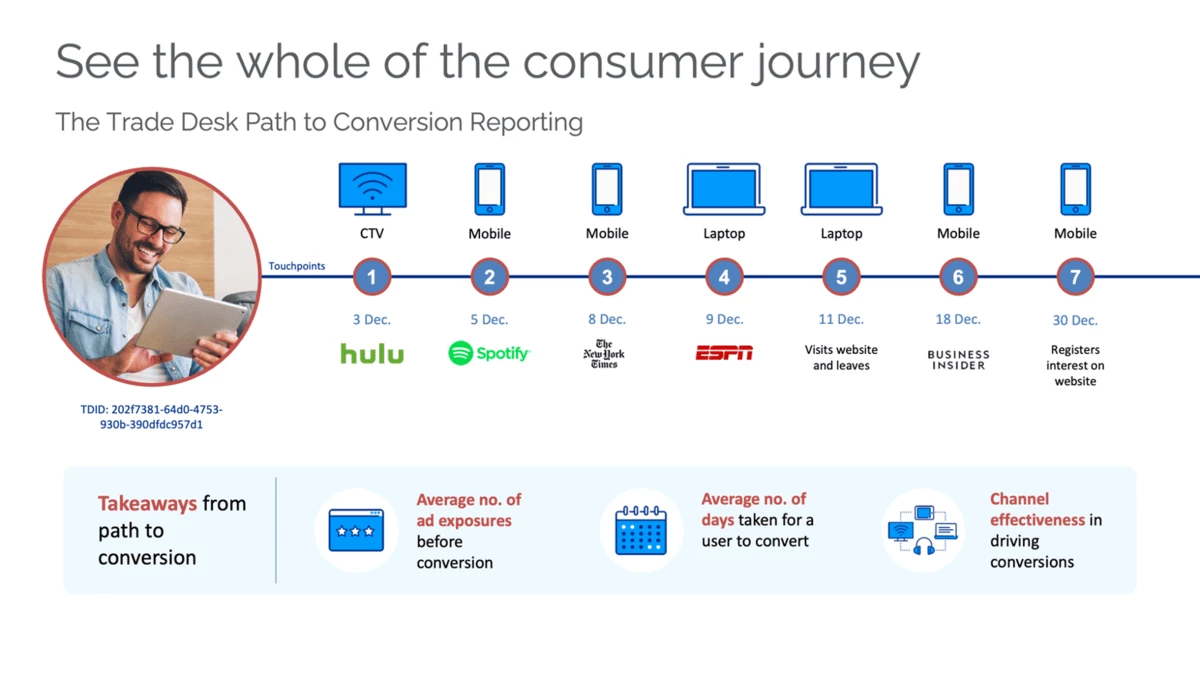
How Path to Conversion Works
Programmatic DSPs, like The Trade Desk (TTD), track user device IDs, cookies, and cross-channel data to map ad exposures before a conversion. Then, they combine these exposure logs with pixel or event data to determine which impressions occurred along the journey.
Attribution models (linear, time decay, position-based) assign credit differently, helping marketers evaluate influence, not just the last touch.
Post-Click Conversion vs. Post-Impression Conversion
All path to purchase behavior is a journey. Post-click metrics only show the last point on that journey and discount all the steps that took place prior.
Post-click conversions occur after someone clicks on an ad within the set lookback window. This is more typical of search and social. Most programmatic digital ad clicks, on the other hand, don’t lead to conversions, as they can be fleeting and accidental. Whenever possible, we should also measure post-impression activity and optimize campaigns to maximize both conversion types.
Post-impression data is captured when a user is served an ad and later converts without clicking the ad. These impressions are tracked through programmatic ad servers and pixels placed on your site or app. Post-impression conversions occur after exposure within the set lookback window. For example, a user sees a display ad and then visits the website organically 5 days later to make a purchase. In this case, Display should receive post-impression conversion credit.
The Right Lookback Window
An attribution or lookback window is how far back in time you count an impression or click as influencing a conversion. This varies by client and product and may be based on fast vs. long sales cycles.
Path to Conversion data can help inform your lookback window by showing the average number of days between first exposure and conversion. If you spend significantly on upper-funnel media like OTT and audio but see few conversion paths that include these channels, then you may need to lengthen your attribution window to capture the full picture.
Example:
- E-commerce: typically has shorter windows (1–7 days)
- Healthcare, financial services, senior living: longer windows (14–60 days)
Meta and other platforms may not be as flexible as The Trade Desk platform. Your programmatic path to conversion technology platform should allow setting the lookback window at the account level, and Google conversion events can each have their own attribution window. Meta, on the other hand, provides just a few options that are primarily focused on post-click activity: 1-day click, 7-day click, 28-day click, 1-day view, and 1-day engaged-view.
Reporting That Shows Influence
Programmatic path-to-conversion reporting through platforms like TTD identifies all programmatic impressions a user/ID receives prior to conversion, showing each channel’s role and the number of impressions needed to influence a user’s behavior.
Search and social lift reporting, another form of cross-platform measurement, typically shows that users exposed to programmatic media before clicking a search or social ad converted at higher rates than those who were not exposed to these channels. Search and social lift reports compare exposed vs. non-exposed audiences to determine the incremental impact of programmatic campaigns on conversion.
Charts or visuals can be used to show the lift from having an omni-channel media strategy. See the example below from a financial services client’s FY recap, which shows that users exposed to more than one channel converted at higher rates.

Path to conversion data helps demonstrate the incremental value of awareness channels (OTT, display, audio), optimizes the media mix more intelligently by identifying the most influential combinations of touchpoints, and justifies continued investment to leadership.
An accurate path-to-conversion reporting framework relies on clean tagging, consistent pixel setup, and aligned conversion events across platforms. A single missed tag or misaligned pixel can skew attribution results.
By understanding the true path to conversion, marketers can better allocate budgets to channels that influence behavior, not just those that earn clicks.
Practical Takeaways for Marketers
- Use path to conversion reporting to show the true influence of upper- and mid-funnel media tactics.
- Don’t treat your website metrics as the only source of truth for campaign performance. These tools only give credit to the last step in the user journey.
- Include impression-based attribution and lift studies for a fuller picture.
- Customize lookback windows to your customer journey.
- Always compare across channels (video, display, social, search).

